

🔐 Request and manage certificates
Introduction
The Bitiful Certificate Center manages all certificates on the platform in one place and supports two types: custom certificates and auto certificates.
Usage notes
- Custom certificates don't support automatic renewal yet.
- Each account currently gets 5 free Let's Encrypt single-domain auto certificates.
- Starting August 2026, auto certificates support:
- Google GTS certificates
- ECC certificates
- Multi-domain certificates
- Wildcard certificates
- Billing starts in August 2026.
Key features
- Fully automatic issuance and renewal of domain certificates (ACME)
- Renewed certificates are automatically bound to associated S4 buckets and CDN projects
- Support for Let's Encrypt and Google Trust Services (GTS supported starting August 2026)
- Support for the two main certificate types, RSA and ECC (ECC supported starting August 2026)
- Use the Certificate API to integrate auto certificates into other infrastructure
Getting started
Make sure you have signed up for a Bitiful account and completed real-name verification (you get the corresponding free tier right away).
Sign up or sign in
Sign up for and sign in to the Bitiful S4 console, then click CDN in the left sidebar to open static acceleration management.
Request an auto certificate
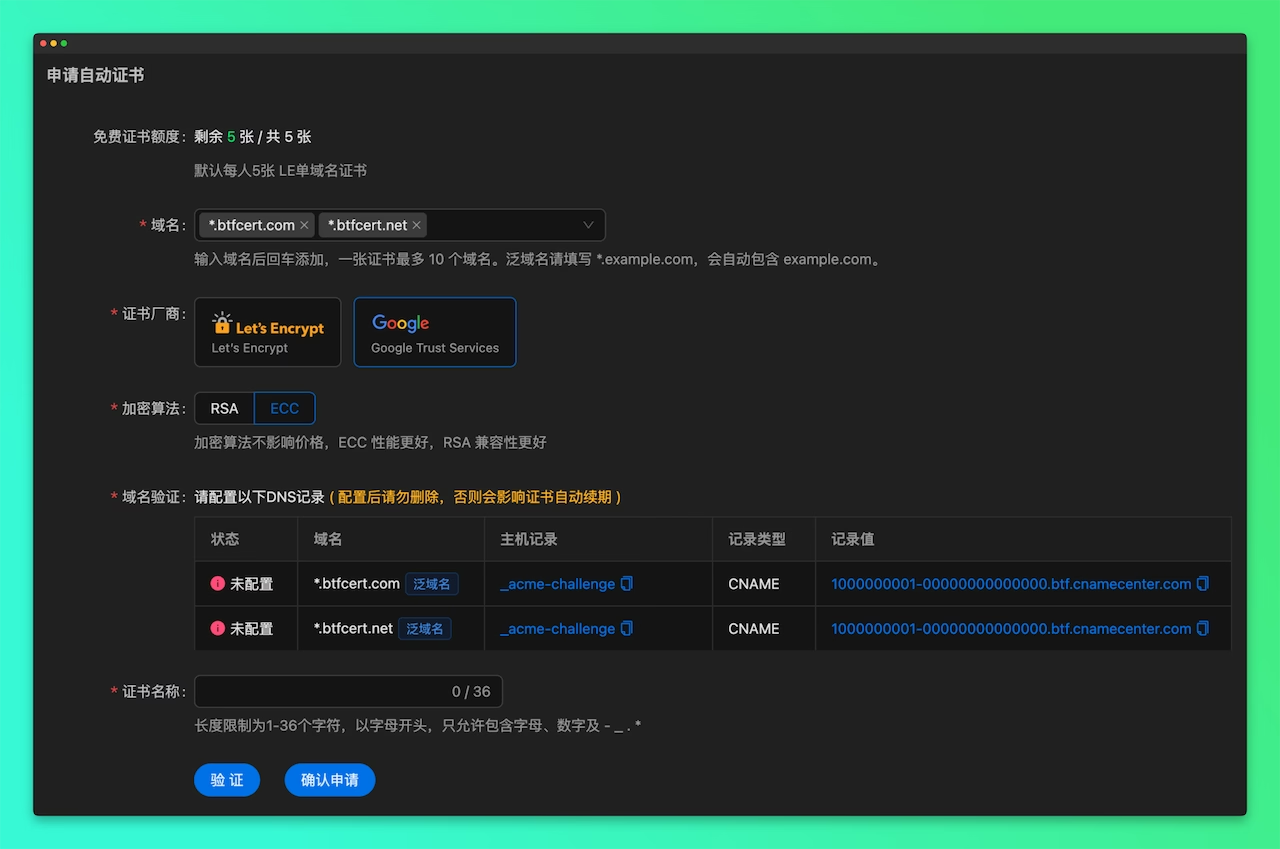
- Click Request Auto Certificate in the upper-right corner.
- Enter the domain you want the auto certificate for, such as cdn.minute.cn (no ICP filing required; ICP filing is the registration required for websites hosted in mainland China).
- Go to your domain's DNS hosting provider (for example, eName) and add the verification CNAME record.
- Choose a unique and memorable name for the certificate (auto certificate names can't be changed for now).
- Click Verify. When you see CNAME configured, click Confirm Request.
- Don't close the request window. Wait patiently until the request completes.
Apply the certificate
Auto certificates can be applied to:
- Custom domains bound to buckets
- Accelerated domains in CDN
- Your own infrastructure, securely and conveniently, via the Certificate API
Make sure the domains bound to your buckets and CDN match the target certificate.