Image watermarks
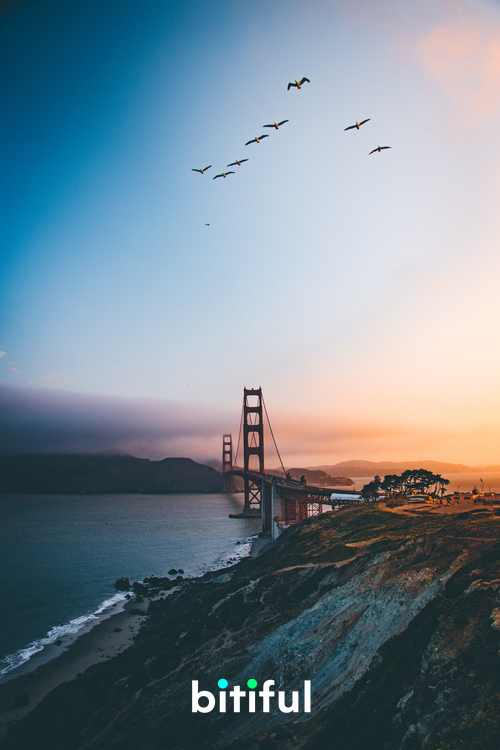
All examples below use this source image: https://demo.bitiful.com/bridge.jpeg
Image watermarks apply only to static images. Animated images (GIF, animated WebP, APNG, and so on) are returned as-is, without a watermark.
Parameters
Watermark image source
Supported formats: SVG / JPEG / PNG / WebP / AVIF / HEIC / BMP
- The watermark image must be stored in the same bucket as the source image.
- For a semi-transparent or irregularly shaped watermark, use a PNG, WebP, or AVIF with an alpha channel, or use an SVG.
- SVG watermarks are rendered as vectors at the target size, so they stay sharp when scaled up (supported since July 2025).
Parameter overview
| Parameter | Description | Default | Values |
|---|---|---|---|
mark | Watermark image path: the object's path in the bucket (e.g. img/logo.png). If empty, no watermark is added. URL-encoding is recommended | Empty | An image in the same bucket |
mark-pos | Watermark position, in the form x,y. See "Position syntax" below | 0.96,0.98 | – |
mark-pct | Maximum size ratio. If the watermark is larger than the image width/height × this value, it is scaled down proportionally; a value greater than 1 lets the watermark extend beyond the image. Use x,y to constrain width and height separately | 0.25 | Greater than 0, up to 5 |
mark-alpha | Opacity: 0 is fully transparent, 1 is fully opaque | 1 | 0 to 1 |
mark-blend | Blend mode | normal | normal / multiply / screen / overlay / darken / lighten / soft-light / hard-light / difference / add / subtract |
mark-tile | Tiling. Set to 1 to tile the watermark across the entire image, with alternate rows offset | Off | 1 |
mark-tile-gap | Tile spacing, in the form horizontal,vertical; percentages are relative to the watermark's own width and height | 50% | Pixels or percentage |
mark-tile-rot | Tile tilt angle | 0 | -90 to 90 |
mark-if-min-widthmark-if-min-height | Size threshold. No watermark is added if the image width or height is below this value, so thumbnails aren't covered by the watermark | No limit | Pixels |
mark-hdr-rate | HDR brightness boost (shared with text watermarks). Applies only to HDR output with a gain map. 0 means no boost, 1 means maximum brightness | 0.5 | 0 to 1, or 0% to 100% |
For raster watermarks, mark-pct is an upper bound: the watermark is only scaled down, never up. For SVG watermarks, it is the target size: the watermark is rendered at that ratio.
Position syntax
The x and y values of mark-pos are independent, so you can mix different syntaxes. If you specify only one value, it applies to both directions. Positions are calculated against the processed image (after resizing and cropping).
Ratios (less than 1) support three anchoring modes:
| Syntax | Anchor | Effect |
|---|---|---|
0.5 | Positioned proportionally within the range where the watermark stays fully inside the image: 0 is flush with the left/top edge, and values closer to 1 move it toward the right/bottom edge | The watermark is always fully visible |
*0.5 | The watermark's center is placed at this ratio of the image | Near an edge, up to half of the watermark can extend beyond the image |
**0.5 | The watermark's left/top edge is placed at this ratio of the image | Near the right/bottom edge, the watermark can move entirely outside the image |
Absolute values (1 or greater): the pixel offset of the watermark's top-left corner from the image's top-left corner.
We recommend setting mark-pos to a ratio less than 1. Source images vary in size and aspect ratio (especially after resizing and cropping with w and h), and ratios keep the watermark position consistent across images.
Example
Place the logo stored in the bucket at the bottom center of the image:
URL: https://demo.bitiful.com/bridge.jpeg? mark=static/img/bitiful-logo@3x.png & mark-pos=0.5,0.95